How to Organize Notes for University Courses
Learn how to organize notes for university courses with course-code folders, tagging, versioning, and review schedules that make revision faster and more


You've got lecture notes in a notebook, a document named “Week 4 final,” a few photos of the whiteboard, and a folder that's tidy enough to look reassuring. Then an exam question comes up, and you can't remember where you put the explanation. The problem isn't that you haven't organized your notes. It's that your system doesn't help you retrieve and use them.
Learning how to organize notes means building a path from a lecture to a useful question, example, or explanation weeks later. A course code can tell you where a note belongs. A cue question can help you check whether you've actually learned it. Both matter, but they do different jobs.
Why Most Note Organization Fails Before Exams
Exam week has a way of exposing weak note systems. A file can be neatly labeled and still leave you stuck when a question asks for the cause, the exception, or the worked example you remember seeing somewhere.
That gap is common. In a 2025 study of 479 university students, rereading was used by 49.9% of students and note-taking by 48.4%, while retrieval practice and distributed practice were rarely used, according to the study of student learning strategies (opens in a new tab). Taking notes and sorting them can feel like studying. The harder test is whether the system helps you pull an idea back from memory and use it.
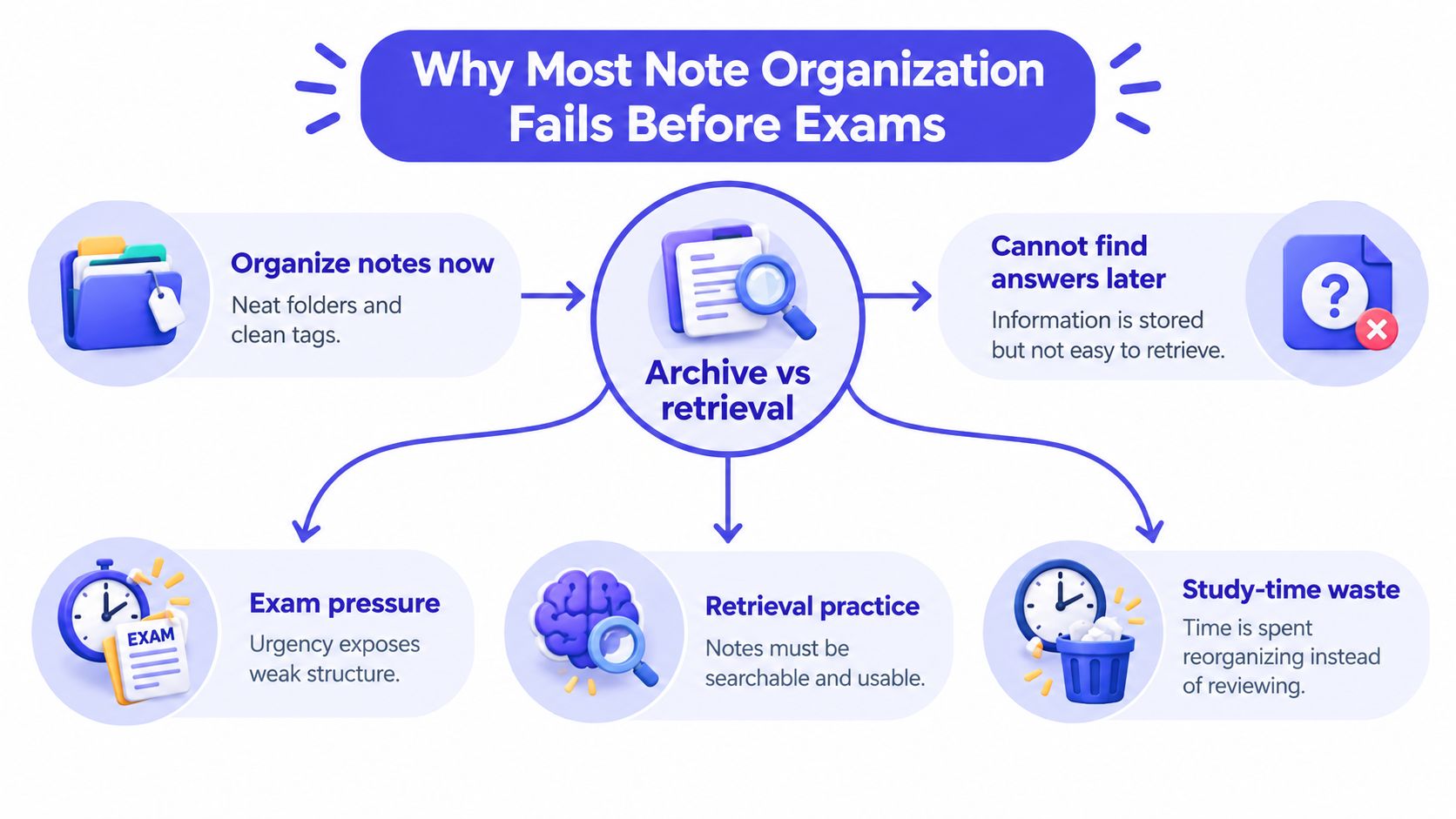
A study of occupational-therapy students described the same trade-off: many students spent regular time after class organizing or reviewing notes, and repeated sorting could crowd out practice.
Organization has two jobs. The archive tells you where course materials live. The study system helps you retrieve, explain, and apply what is in them. A reliable archive works like a campus map: it gets you to the right building. Retrieval is the exam itself: it shows whether you can find the answer when nobody hands you the map.
Labels earn their keep when they lead to prompts: a question to answer, a diagram to redraw, a problem to solve, or a weak topic marked for another look. The goal is a page you can test yourself from weeks later.
Building a Course-Code Folder Structure That Scales
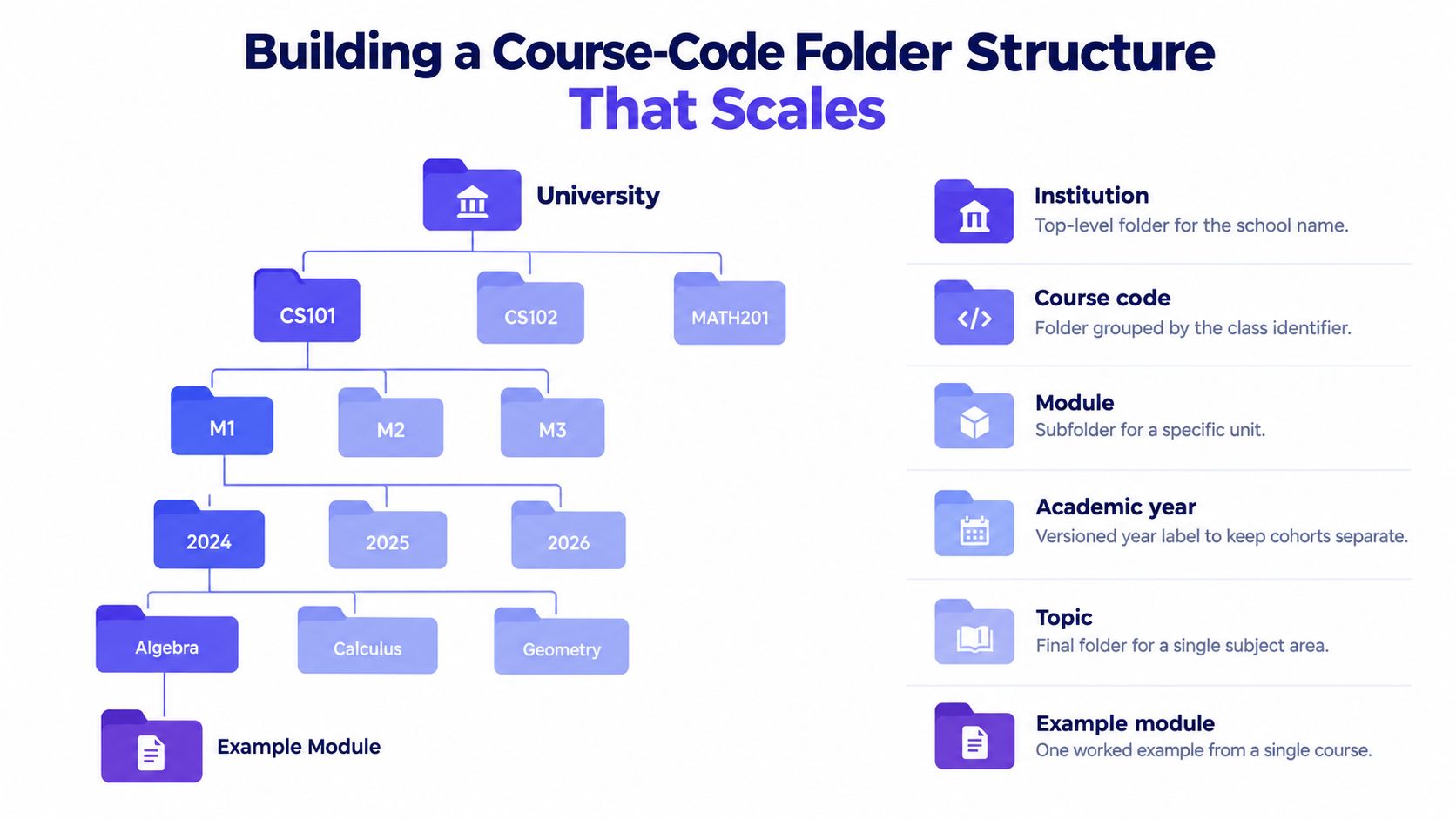
Start with the labels your university already uses. A course code is usually more precise than a broad subject name: “biology” might describe several classes, but the exact code identifies the course that matches your syllabus and course materials.
Build the folders from broad to specific. For example:
Institution
└── Course code
    └── Academic year
        └── Module
            └── Topic
A student might file notes this way:
North Campus University
└── BIO204
    └── 2026–27
        └── Module 3
            └── Cell Signalling
The actual labels should follow your institution's terminology. If your syllabus calls a unit a “block” rather than a “module,” use “block.” Familiar labels make it easier to find and match notes to course materials.
Give every note set a useful label
A folder path won't help much if the files inside it are called “Lecture notes” or “Untitled.” Give each set enough information to identify it without opening the file:
CourseCode_Module_LectureDate_Topic
For example: BIO204_Module3_2026-10-12_CellSignalling.
At the top of the notes themselves, include the institution, course code, module, lecture date, topic, textbook chapter, and academic year. The page-level label protects you if you move a file, print it, or share a page outside its original folder.
Cross-module ideas shouldn't be copied into several locations. Keep one main note in the most relevant topic folder, then link to it from the other modules where it applies. Work by PhD students on synthesis notes distinguishes annotations within individual sources, summaries of sources, and cross-source syntheses; participants used an average of 4.2 tools for different note-taking tasks, as summarized in this academic chapter on researchers' note-taking practices (opens in a new tab). The practical lesson is to name and connect notes consistently, rather than scattering near-identical versions across folders.
Try this retrieval check: choose a lecture at random and see whether you can locate its notes using just the course code and topic. If you can't, adjust the labels before adding more material.
Tagging, Linking, and Versioning Without Duplicating Work
Tags, links, and versions can all make notes easier to move through, but they solve different problems. Combining them into one elaborate system often creates extra work without making the information easier to recall.
Use tags for cross-cutting labels
A tag describes a note in a way that might apply across different modules. Useful examples include exam relevance, prerequisite knowledge, or compare-and-contrast question. Keep the list small and use the same wording each time. If you tag one note exam and another exam revision, searching may leave you with two incomplete sets.
A simple check helps: if the label describes what kind of study task or relevance the note has, it may be a tag. If it describes where the idea comes from or what it connects to, a link is usually better.
Link related information rather than copying it
A link points to another note, reading, example, or practice question. Suppose your cell-signalling notes refer to a mechanism from an earlier lecture, a textbook chapter, and a past-paper question. Link each item from the relevant note instead of copying the same explanation into several files. You can explore a Zettelkasten approach to linking ideas if you want to develop a more connected note system.
Version drafts, not the underlying course material
Use a version label when you revise a summary or study guide over time. A title such as BIO204_Module3_Review_2026-10-12_draft makes its status clear; when you update it, keep one current version and note the change rather than saving files called “final,” “final2,” and “final-revised.”
Practical rule: Tag for study purpose, link for relationships, and version when a note changes.
If you're unsure whether to create a new note, first ask whether a link would do the job. One clear source note plus well-chosen connections is usually easier to maintain than several copies that can fall out of sync.
Choosing Between Paper, Digital, and Hybrid Setups
Paper and digital notes are not competing answers for every class. Choose the format based on what you need to capture and how you'll use it later. A quantitative study of 100 university students reported that digital notes were valued for convenience, accessibility, organization, and multimedia integration, while handwriting was perceived as better for concentration, memory retention, and deeper processing (study of university students' note-taking preferences (opens in a new tab)). Those findings describe reported preferences, not a rule that every student learns better in one format.
Make the format fit the task
Digital notes can work well for course-wide indexing, searchable lecture transcripts, links, and multimedia. Handwriting can suit equations, diagrams, and ideas that you're still working through, especially when typing would tempt you to transcribe too much. The risk is not the device itself: quickly copying a lecture word for word can leave little room to decide what the ideas mean.
A hybrid setup can be simple. Write or annotate the difficult part by hand, then file it with a digital label that identifies the course, module, date, and topic. Add a short digital summary or question pointing back to the handwritten page. That connects the formats without asking you to type every line twice.
Also plan for practical constraints. Digital notes need a device and a workable backup; paper notes need a reliable index. Screen fatigue, accessibility needs, visual course materials, and unreliable devices may affect what works for you. The guide to note-taking apps for students can help you compare digital options, but the useful test is whether you can find and review your own course material consistently.
For course-specific materials, CramShare lets students search resources by institution, course code, subject or module, textbook, and academic year. It offers a free community library and premium document previews, which can help you judge whether a resource matches your course before you use it. Treat shared materials as a supplement to your own coursework, not a substitute for attending class or following your institution's academic-integrity rules.
Turning Organized Notes into Review Prompts
Notes become more useful for exam preparation when they ask something of you. A page that you can only recognize while reading it may not be a page you can reproduce or apply under pressure.
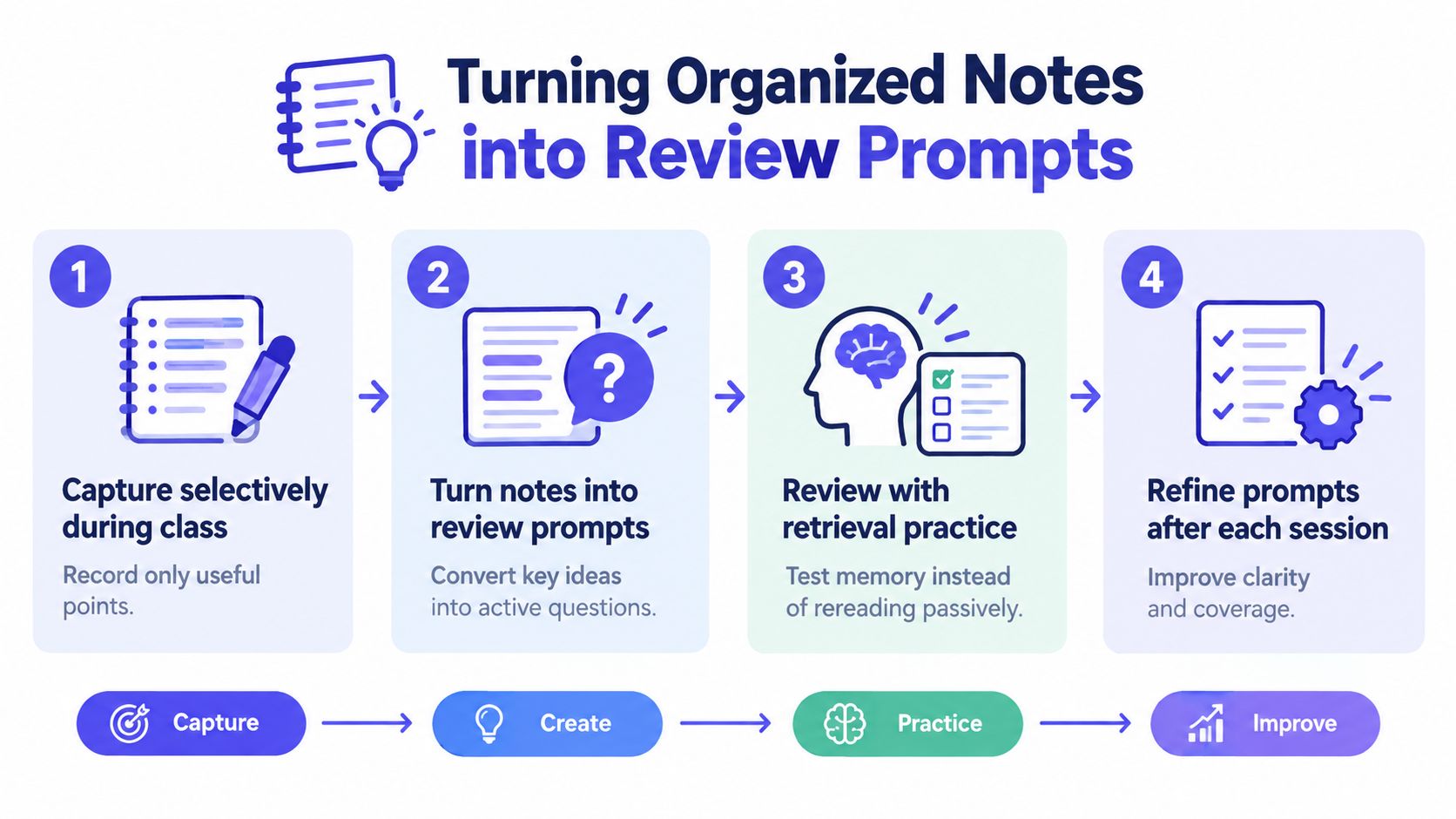
Use a two-stage routine. During class, capture the relationships between ideas, definitions, examples, and questions you still have. Soon afterward, turn the important material into prompts that you can answer without looking. A Cornell page makes the workflow visible: use the main area for class notes, a narrow cue column for questions, and a summary area for the central idea.
Make cues that demand an answer
If your note says “cell signalling: receptor activation leads to a cascade,” don't settle for highlighting that sentence. Add a cue such as “What happens after receptor activation, and why does the sequence matter?” For a mathematics lecture, ask what assumptions a method uses and when it applies. For a history topic, a comparison prompt may be more useful than a list of names.
Within 24 hours, add the cues while the lecture is still familiar, write a short synthesis, and try answering from memory. Turn a process into a diagram to redraw, a definition into a flashcard, or an example into a problem to solve. A guide to making revision notes can help you shape concise summaries, but keep the questions tied to your actual learning objectives.
Evidence supports taking the cue-and-review stage seriously. In a quasi-experimental study, 128 health-science students were divided into a Cornell note-making group of 62 and a control group of 66. The intervention produced positive effects on note quality and learning performance; Cornell's academic guidance also recommends at least ten minutes weekly to review previously created notes (study of Cornell note-making (opens in a new tab)).
Schedule recall, not just another read-through
Set aside brief review checkpoints across the time between class and the assessment. At each checkpoint, hide the notes, answer the cues, and check what you missed. If a cue is too broad to answer clearly, revise it; if you can answer it easily, keep it available for a later review rather than rewriting the page.
Copying slides or sentences may make notes look complete, but it doesn't automatically help you process them. In a neuroscience study, verbatim copying in handwritten notes was negatively associated with learning, while including key terms was positively associated. The useful habit is to select and explain, then test what you can retrieve.
Fixing the Most Common Organization Mistakes
When a note system stops helping, the fix usually isn't more colors or more folders. Look at what's making retrieval hard, then change the specific part that's failing.
- The table has become too large. If it takes effort to understand the table's structure, split it by topic or use a different format. A matrix suits comparisons across fixed criteria, such as theories, cases, or formulas.
- Terms keep changing. Pick one label for each concept and use it in your notes, tags, and file names. Consistent terminology makes search more dependable.
- Notes contain no prompts. Add questions, practice tasks, or a diagram to reconstruct. A page that has no way to test recall can remain an archive rather than a study tool.
- Folders and tags multiply. Merge duplicates, remove labels you don't use, and stick to a small set of consistent categories.
- The format doesn't fit the subject. Use an outline when material is hierarchical. Use a matrix when the task is comparison. Use a concept map or annotated diagram when mechanisms and dependencies matter.
A matrix can be useful when you also check your understanding instead of merely filling in cells. In an online-text experiment reported by the U.S. Institute of Education Sciences, 39 students using matrix note-taking with monitoring outperformed students using conventional note-taking on factual and application tests. The reported intervention and comparison means were 15.75 versus 11.10 for factual questions and 13.50 versus 10.15 for application questions (IES study of matrix note-taking (opens in a new tab)). These are results from a specific experiment, not a promise of the same outcome in every course.
Try a retrieval check before you rebuild your whole system. Hide the note contents and answer the cues. Reconstruct a process from memory, then check whether you left out a step or relationship. Turn any gap into a specific question for your textbook, instructor, or legitimate course resources.
Your Weekly Note Organization Routine
A student opens a folder the night before an exam and finds files named “Lecture 4,” “Lecture 4 final,” and “Week 4 notes.” A brief weekly routine can prevent that scramble and make each course's notes easier to retrieve and test from.
After each lecture, label the file with the course code, module, date, and topic. Midweek, turn key ideas into questions, worked examples, or diagrams. At the weekend, answer those cues from memory, then update any summary that needs correcting. The labels help you find the right material; the prompts help you check what you can recall.
Some occupational-therapy students spent one to two hours organizing or reviewing notes after class, as noted earlier. Time spent formatting is not evidence of learning. Keep the routine focused on retrieval, and stop when the notes are findable and the review questions are usable.
Start with one existing note set. Add its course code, module, lecture date, and topic, then write three questions you can answer without looking. Course-specific lecture notes, summaries, revision guides, and past papers can supplement your own work when they match your course and follow your institution's academic-integrity policies.
Use CramShare to search for course-specific lecture notes, summaries, revision guides, and past papers by institution, course code, module, textbook, and academic year. Compare matching resources with your own notes, and use them to support your study rather than replace your coursework.